Endpoint take action from Teams - Carbon Black
Browse: 🏠 · Solutions · Connectors · Methods · Tables · Content · Parsers · ASIM Parsers · ASIM Products · 📊
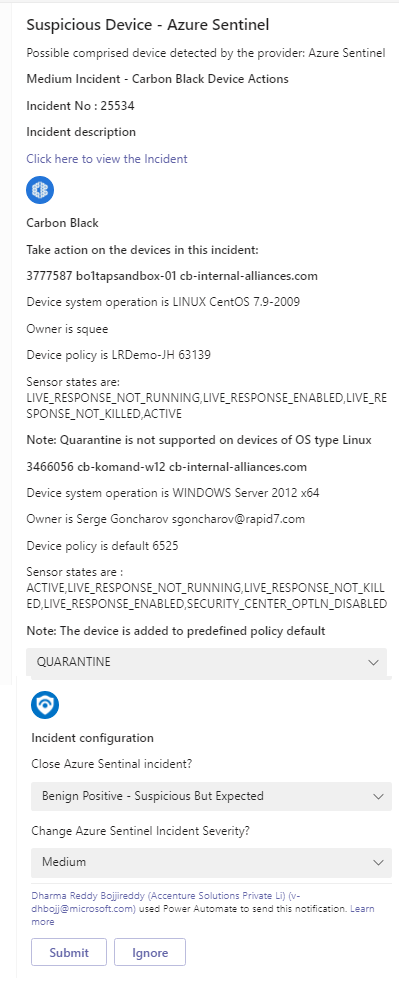
This playbook sends an adaptive card to the SOC Teams channel, lets the analyst decide on action: Quarantine the device or Update the policy. It posts a comment on the incident with the information collected from the Carbon Black and summary of the actions taken, and closes the incident if required.
| Attribute | Value |
|---|---|
| Type | Playbook |
| Solution | VMware Carbon Black Cloud |
| Source | View on GitHub |
Additional Documentation
CarbonBlack-TakeDeviceActionFromTeams playbook
## Summary When a new Sentinel incident is created,this playbook gets triggered and performs below actions 1. Fetches the devices information from CarbonBlack 2. Sends an adaptive card to the SOC Teams channel, let the analyst decide on action: Quarantine the device or Update the policy based on SOC action
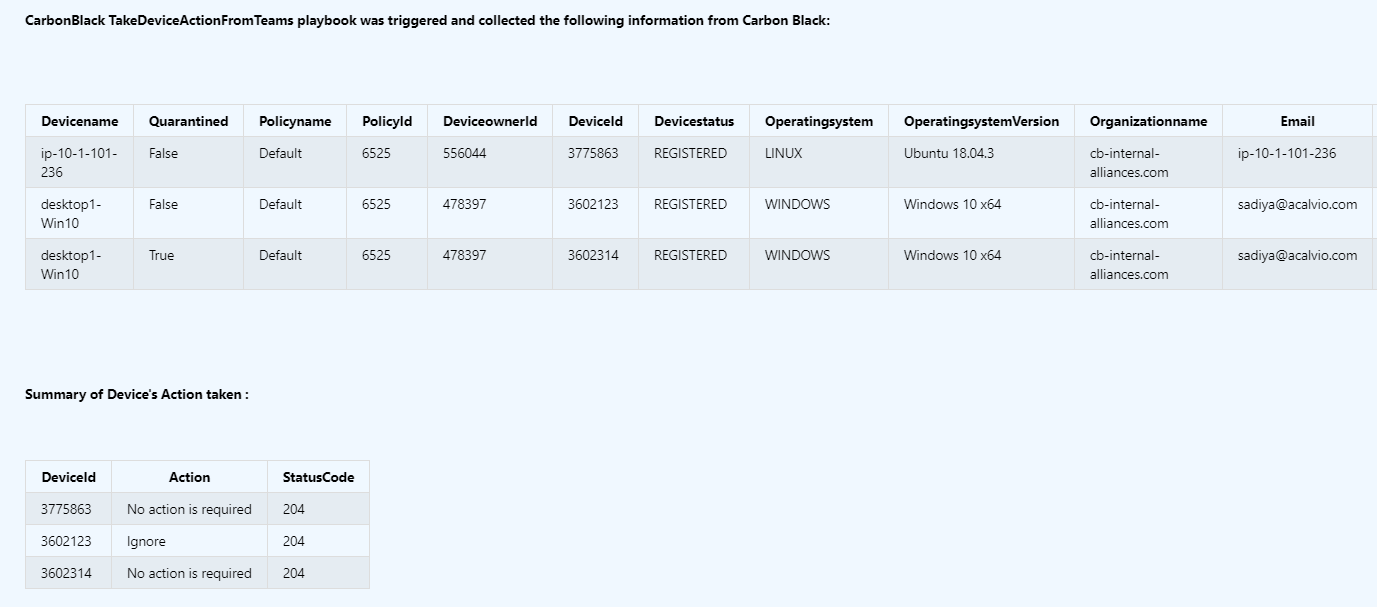
- Add a comment to the incident with the information collected from the carbon black, summary of the actions taken and close the incident
Prerequisites
- CarbonBlack Custom Connector needs to be deployed prior to the deployment of this playbook under the same subscription.
- Generate an API key.Refer this link how to generate the API Key
- Find Organization key by referring this link Find Organization key by referring this link
Deployment instructions
- Deploy the playbook by clicking on "Deploy to Azure" button. This will take you to deploying an ARM Template wizard.
- Fill in the required parameters:
- Playbook Name: Enter the playbook name here (Ex:CarbonBlack-TakeDeviceActionFromTeams)
- OrganizationKey: Enter the Organization key
- PolicyId: Enter the PolicyId
- Teams GroupId: Enter the Teams GroupId
- Teams ChannelId: Enter the Teams ChannelId Refer the below link to get the channel id and group id
Post-Deployment instructions
Authorize connections
Once deployment is complete, you will need to authorize each connection. 1. Click the Microsoft Sentinel connection resource 2. Click edit API connection 3. Click Authorize 4. Sign in 5. Click Save 6. Repeat step 2&3 while for CarbonBlack connector Connection to authorize connector API of the playbook (For authorizing the CarbonBlack API connection, API Key needs to be provided. API Key Value is the combination of API Key / API ID)
Configurations in Sentinel
- In Microsoft sentinel analytical rules should be configured to trigger an incident with risky device
- Configure the automation rules to trigger this playbook
Playbook steps explained
When Azure Sentinel incident creation rule is triggered
Azure Sentinel incident is created. The playbook receives the incident as the input.
Entities - Get Hosts
Get the list of risky devices as entities from the Incident
Initialize the below variables
a. PolicyId - Assign the pre-configured policyId value
b. OrganizationId - Assign the OrganizationId
c. Information - SOC will take the action based on the note
d. ActionSummary - Assign the summary of the actions taken by SOC
e. AdaptiveCardColumnsList - Assign the dynamically prepared columns list to show in the adaptive card [ Each device information returned from CarbonBlack ]
f. DeviceActions - Choice list contains actions information [ Quarantine, Update_Policy and Ignore ]
g. AdaptiveCardColumnsList - Assign the dynamically prepared columns list to show in the adaptive card [ Each device information returned from CarbonBlack ]
h. AdaptiveCardBody - Accessing the dynamically prepared adaptive card body
i. Hosts - Assign the Hosts information
j. CarbonBlackDeviceInformation - Assign the CarbonBlack device information
k. DevicesActionsNeeded - Assign the devices information that needs SOC action
l. ComposeProductname - Compose the product name
For each-Hosts
This action will perform the below actions a. Make a call to CarbonBlack API with the parameters such as Organization Key and Query [ Contains device name ]
b. Verify the CarbonBlack API response_mode
c. Check if the device is quarantined or assigned to predefined policy
[Content truncated...]
Browse: 🏠 · Solutions · Connectors · Methods · Tables · Content · Parsers · ASIM Parsers · ASIM Products · 📊